

Planning something like this? I'll talk it through with you. 30 minutes, no obligation.
Mostly, yes. We hid 29 facts across a Webflow test page, then asked ChatGPT, Claude and Gemini to find them. Claude and Gemini got 86% right, and ChatGPT 83%.
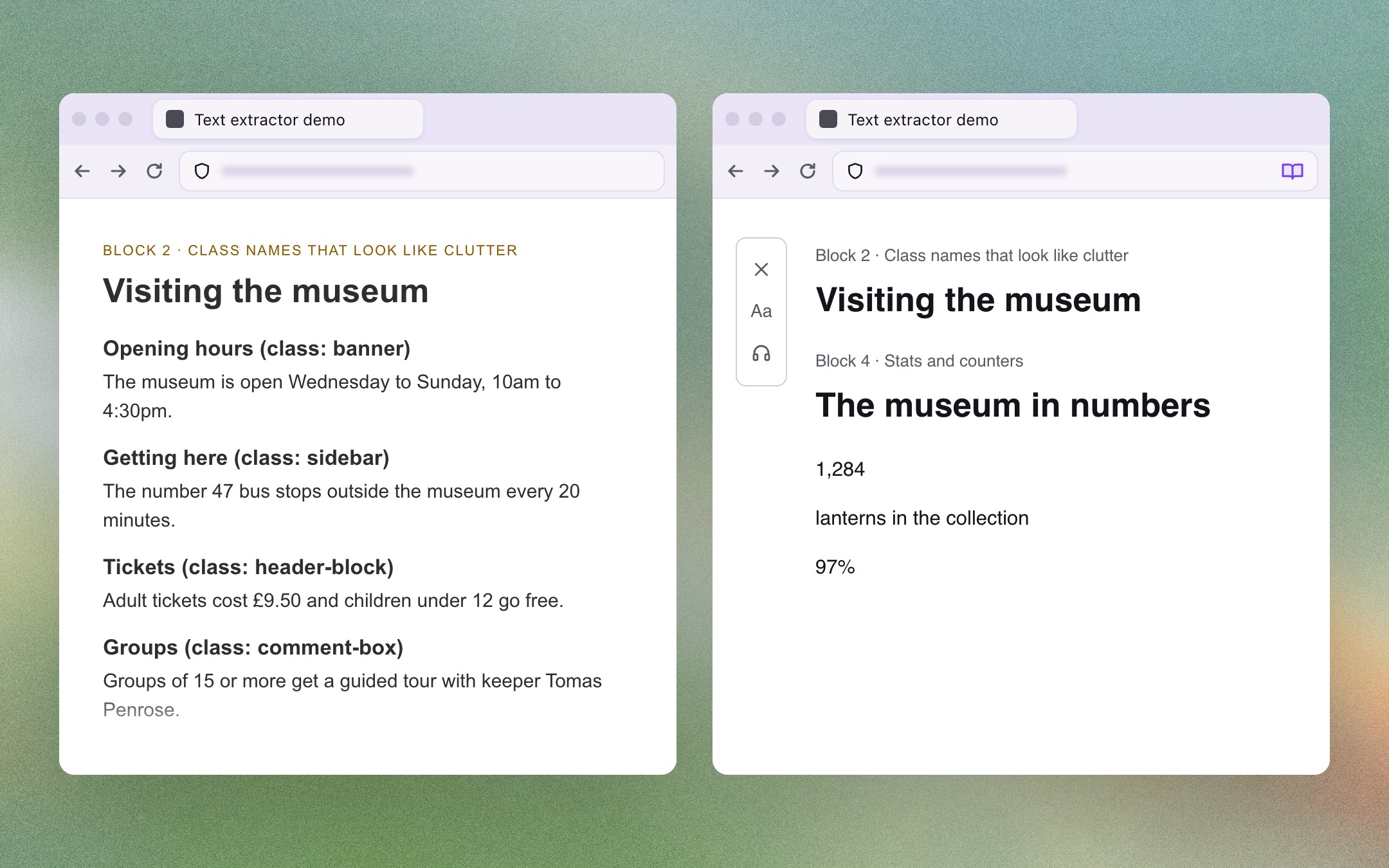
The rest is where it gets interesting: text added by scripts, an animated counter they all read as 0, hint text in a form and anything past page 1 of a list. ChatGPT even lost a whole section, just because its class name contained the word "banner".
If you look after a Webflow site, here’s what we found, what worked well and what to change so AI tools quote your real prices, opening hours and services. If you’d rather we checked it for you, we do that for one fixed price.
Why does it matter what AI tools can read on your site?
AI tools can only repeat what they can read. When someone asks ChatGPT, Claude or Gemini about your business, the assistant often opens your website to find the answer. If a fact like a price, your opening hours or your address sits somewhere it can’t read, it either says it doesn’t know or gets it wrong. Asked how many visitors our test museum gets a year, every assistant said 0. The real number was 6,400.

Your site is now read by AI in three ways, and the same problems affect all of them:
- Answers. An assistant opens your page when someone asks about you, and repeats what it finds.
- AI search. ChatGPT, Claude and Perplexity build their own search indexes, and Gemini and Copilot draw on Google’s and Bing’s. These decide which sites get cited.
- Training data. Billions of pages are turned into text to train AI models, which shapes what they already know about your business.
Getting this right means AI tools describe your business with your real facts, not a gap or a guess. Most of the fixes are content changes your marketing team can make in Webflow. The rest are build changes for your developer.
An AI assistant doesn’t see your website the way a visitor does. It sends a bot to fetch the page’s code, then cuts it down to text before the AI reads it. ChatGPT’s tools are different from Claude’s, and both are different from Gemini’s. None of them publish exactly how theirs work, so the only way to find out is to test a page and see what each one says it sees.
Which bots do ChatGPT, Claude and Gemini send to your site?
Each AI company sends its own bots, and it’s the bots’ names, not ChatGPT or Claude, that show up in your robots.txt file and server logs. Most run up to three: one that reads a page when someone asks, one that builds its AI search index and one that collects training data. Blocking one doesn’t block the others.
| AI assistant | Reads a page when someone asks | Builds its search index | Collects training data |
|---|---|---|---|
| ChatGPT (OpenAI) | ChatGPT-User | OAI-SearchBot | GPTBot |
| Claude (Anthropic) | Claude-User | Claude-SearchBot | ClaudeBot |
| Gemini (Google) | Google-Agent, when a Google AI agent browses for someone | Googlebot, the same bot as Google Search | Googlebot. A Google-Extended rule in robots.txt opts you out of training and of Gemini’s answers. |
| Copilot (Microsoft) | Answers from Bing’s index | Bingbot, the same bot as Bing search | Bingbot. Opting out uses meta tags on the page, not robots.txt. |
| Perplexity | Perplexity-User | PerplexityBot | None. Perplexity says it doesn’t train models on what it crawls. |
| Meta AI | meta-externalfetcher | meta-externalagent | meta-externalagent |
| Grok (xAI) | Not published. xAI doesn’t document its bots, so robots.txt can’t reliably control them. | ||
The search bots decide whether you get cited in AI search, so they’re the ones to make sure you aren’t blocking. The bots that read a page when someone asks may not check robots.txt at all: OpenAI, Google, Meta and Perplexity say theirs may ignore it, because a person asked for the page. Claude-User is the exception, as Anthropic says blocking it stops Claude reading your pages for people.
One more catch: blocking Google-Extended to keep your content out of Gemini’s training also keeps it out of Gemini’s answers.
Whichever bot fetches your page, what happens next is much the same. The page gets cut down to text.
How do AI tools decide what to ignore?
Most tools that turn a web page into text throw away anything that looks like clutter. You don’t need the navigation to read an article, so it goes, along with footers, share buttons, comments, related posts and cookie banners. We assume that’s mostly to keep costs down: a page can be mostly code with only 100 words of real text, and sending or storing all that code costs money.
We can’t see inside the assistants’ own web tools, but many of the text extractors that do this job are open source, so anyone can read the code and see what they keep or drop. We don’t know whether ChatGPT, Claude or Gemini use any of them, but they show what the people who build these tools count as content. They’re used in more places than you might expect:
| Use | What happens |
|---|---|
| Assistant and agent web tools | The page is cut down to text before the AI reads it. |
| Training AI models | Billions of pages go through an extractor to build training data. FineWeb, one of the big public datasets, was built with trafilatura. A dropped section isn’t in the training data. |
| Search and answer engines | Pages are stored as text, and the best passages pulled out as answers. |
| Company chatbots | An extractor turns a set of websites into text the chatbot can look things up in. |
| Reader views and web clippers | Firefox’s Reader View uses Readability, Safari’s Reader does the same job with Apple’s own version, and Defuddle was made for Obsidian’s Web Clipper. |
Text extractors decide what’s clutter from the type of element and its class name, which is the name your developer gives each part of the page in Webflow’s Designer. Each extractor has its own list of words, and if a class name contains one, the whole section can go. These are the three we tested in most detail, and who uses them:
| Extractor | Who uses it | Words in a class name that count as clutter |
|---|---|---|
| trafilatura | Builds AI training data, including Hugging Face’s FineWeb dataset. Its makers list Hugging Face, IBM, Microsoft Research, NVIDIA and Stanford as users. | banner, sidebar, button, bar, menu, nav, footer, share, social, embed, widget, slide, meta, tags, author, related, cookie, newsletter, overlay, -icon |
| Readability | Firefox’s Reader View, and a free fetch tool that AI apps like Claude Desktop and Cursor can add to read web pages. | removes banner, header, footer, sidebar, menu, comment, extra, related, social, popup, pagination, and marks down promo, share, meta, media, contact, widget, tags |
| Defuddle | Obsidian’s Web Clipper, which saves web pages as notes. It was built as an alternative to Readability. | over 500 patterns, including hero-, cta-, eyebrow, logo, dropdown, -slider, tabs-, card-content, btn-, page-header, promo-box |
They match part of a word too, so trafilatura drops a class called barista_card because it contains bar.
How did we test what AI tools can read?
We built a single Webflow page for a made-up lantern museum. Each section uses a different kind of element and holds facts that don’t exist anywhere else on the internet: opening hours, ticket prices, a keeper’s name, a ferry timetable, a phone number. If a tool can tell us the fact, it read that part of the page. If it can’t, that part went missing.
Each block on the page is labelled with what it tests, and the class names are written into the headings, so we could see exactly which part a tool dropped.
| Section | What it tests | Example fact |
|---|---|---|
| Plain article | the baseline | the first lantern was donated in 1923 |
| Clutter class names | sections called "banner", "sidebar", "promo" | open Wednesday to Sunday |
| Links and buttons | card titles inside links, a button with text | a harbour tour is £12 per adult |
| Counters | a number that counts up from 0 | 6,400 visitors a year |
| Hidden text | hidden text, and separate mobile and desktop copies | the café seats 34 |
| FAQs | four ways of building an accordion | dogs on leads are welcome |
| Rich Text | lists and a quote | a 1:4 mix of vinegar and water |
| Tables | a real table, and one written as text with "|" between columns | the bank holiday ferry is £26 |
| JavaScript | text added after the page loads, or after a click | the harbour wall is 412 metres |
| Form | labels and placeholder text | shifts start at 10am |
| CMS list | 25 entries, 10 per page, over three pages | Log 11: the Gannet |
| Tabs, Slider, Dropdown | Webflow’s own interactive elements | the shop closes 25 and 26 December |
| Footer | facts that only appear in the footer | the postcode is TR19 4QX |
We then asked ChatGPT, Claude and Gemini 29 questions about the page, and ran it through 26 text extractors and extraction services to see which facts came out. Each was tested once, in November 2026, and a fact counts as kept if it appears in what the tool returned.
What did ChatGPT, Claude and Gemini miss?
Claude and Gemini answered 86% of our 29 questions, and ChatGPT 83%. All three missed the animated counter, text added by scripts, text shown after a click and hint text in the form. Gemini only did this well when we were logged in. Logged out, it didn’t open the page at all and answered from search results instead.
| AI assistant | Questions answered | What it missed |
|---|---|---|
| ChatGPT | 83% (24 of 29) | the "banner" section, the counter, script text, text shown after a click, one of two placeholders |
| Claude | 86% (25 of 29) | the counter, script text, text shown after a click, both placeholders (one question) |
| Gemini | 86% (25 of 29) | the counter, script text, text shown after a click, both placeholders (one question) |
All three could see the list had more pages, but none went to page 2. ChatGPT also lost the whole "banner" section, the same way several text extractors did.
What did AI tools read without any trouble?
Most of the page came through, including the parts we expected to cause trouble. All three assistants read Webflow’s tabs, sliders, dropdowns, FAQ accordions, tables, Collection Lists and the footer. Plain text written into the page was read everywhere.
That’s good news for Webflow sites. Webflow writes your content into the page’s code when you publish, rather than loading it in with scripts afterwards, so most of it is already there for AI tools to read. In our markup tests, even the strictest text extractors kept Webflow’s Rich Text, Forms, Buttons, Grids and tab panes.
Most of what did trip tools up applies to any website, whatever it’s built with. Text added by scripts, animated counters and clutter-sounding class names cause the same problems on WordPress, Shopify or a hand-coded site. In Webflow you choose your own class names, element tags and page structure, so most of it comes down to how a site is built and where you put your content.
There’s one Webflow quirk to know about. A Code Embed gets the class w-embed, and some extractors see embed as clutter and skip what’s inside. Tables in a Webflow blog post usually go in an embed, because Rich Text doesn’t have a table option. Even the tables in this post are embeds.
How did the text extractors do?
It depends on the extractor. The ones that convert the whole page kept nearly everything. The ones that look for "the article" lost far more.
| Text extractor or service | Facts it kept |
|---|---|
| Linkup, Parallel, crawl4ai | 92% |
| markitdown, html2text, inscriptis, markdownify, Turndown | 91% |
| Firecrawl, Litescrape | 90% |
| Tavily | 87% |
| readabilipy | 84% |
| You.com | 77% |
| Valyu | 72% |
| Exa | 67% |
| Diffbot | 59% |
| Readability (Firefox Reader View), Defuddle, Jina Reader | 53 to 54% |
| newspaper4k | 38% |
| trafilatura, Serper, Keenable | 31 to 33% |
| boilerpy3, goose3, jusText | 0 to 13% |
Many of these are services that AI apps and agents use to search and read the web. Tavily and Exa are search engines built for AI agents, Firecrawl and Jina Reader turn web pages into text for AI, and markitdown is Microsoft’s converter for the same job. We don’t know whether ChatGPT, Claude or Gemini use any of them, but any AI product built on one sees your site the way it does.
The stricter extractors lost the same things again and again. Sections named "banner" or "sidebar" went completely, opening hours and bus times included. Card titles in links and FAQ questions in buttons went, leaving answers with no questions. Defuddle strips anything marked role="list", which is correct accessibility markup that Webflow adds to Collection Lists, so it lost every item. Tab names, dropdown links and the footer often went too, and trafilatura dropped the table in a Code Embed because of w-embed.
What tripped up every tool?
Five things caught out both the AI assistants and the text extractors:
| What | What happened |
|---|---|
| Text added by JavaScript | All three assistants and most extractors missed it. A few extractors caught text written as the page loaded, but none caught text shown after a click. |
| Animated counters | Our "6,400 visitors a year" counts up from 0. Everything read it as 0, apart from one extractor that caught it mid-count. |
| Form placeholders | The grey hint text in form fields was missed almost everywhere. |
| Page 2 of a list | Our 25 entries showed 10 per page. No assistant went to page 2, and extractors only read it when given the address. |
| Hidden text | The opposite problem. Most tools read text hidden from visitors as if it were visible, so old or duplicate copy can end up in an answer. |
We think most of this comes down to one thing. These tools read the page’s code as it arrives, without running its scripts or applying its styles. That would explain the counter showing 0, the missing script text and the hidden text being read. Vercel found much the same in their own test of AI crawlers in December 2024: OpenAI’s, Anthropic’s and Perplexity’s crawlers didn’t run JavaScript. Google’s Gemini was the exception in Vercel’s test, because it uses Google’s own crawler, but in ours Gemini still missed the script text and read the counter as 0.
What should you change on your Webflow site?
Make sure every important fact is written plainly in the page, somewhere that doesn’t look like clutter. None of this is a rulebook, and not every site needs all of it. It’s a way to look at your site: what do AI tools actually see when they read it? The tools keep changing, so treat it as a work in progress.
What your marketing team can change
Most of these are content changes your team can make in Webflow without a developer. The ones that affected the AI assistants come first.
| Problem | Affected | Don’t | Do |
|---|---|---|---|
| Facts inside widgets | AI assistants | Rely on a third-party widget, like reviews, bookings or a map, to show a key fact. | Repeat its main fact, like your rating or address, as plain text nearby. |
| Form hint text | AI assistants | Put information only in the grey placeholder text in a form field. | Put it in the label or help text, which helps screen reader users too. |
| Old or hidden content | AI assistants | Hide old prices, offers or copy with Display: none or Conditional visibility. | Delete old content, or archive the CMS item. |
| AI bots blocked | All tools | Block every AI bot by default. | Allow the bots that answer questions and power AI search, like OAI-SearchBot and ChatGPT-User, Claude-SearchBot and Claude-User, and PerplexityBot, even if you block training bots like GPTBot and ClaudeBot. In Webflow, robots.txt is in Site settings, under SEO. |
| Facts in the footer, a dropdown or a later slide | Text extractors | Leave the only copy of your address, prices or opening hours there. | Put important facts in the body of the page too, written as a sentence. |
| Figures in tables | Text extractors | Rely on a table alone for an important figure. | Keep the table, which most tools kept, and repeat the key figures in a sentence. |
What to ask your developer to change
These need changes to how the page is built. Again, the ones that affected the AI assistants come first.
| Problem | Affected | Don’t | Do |
|---|---|---|---|
| Text added by scripts | AI assistants | Load text in with a script, like a CMS "load more", or show it only after a click. | Put the text in the page and let scripts only show or hide it. |
| Animated counters | AI assistants | Type 0 in the Designer and let a script count up. | Put the real number in the page, and have the script reset it to 0 and count up only when it scrolls into view. Keep the label in the same sentence. |
| Lists over several pages | AI assistants | Turn on pagination for an important Collection List. | Show up to 100 items on one page, or link each item to its Collection page. At least say how many there are. |
| Separate mobile and desktop copies | AI assistants | Duplicate a section and set Display: none on some breakpoints. | Restyle one element for each breakpoint. |
| Class names | ChatGPT and text extractors | Use words like banner, sidebar, cta, eyebrow, promo, header, footer, meta, widget or slider in a content section’s class name. | Name it after what’s in it, like hours or ticket-prices. |
| FAQ questions | Text extractors | Put the question inside a Button, Link Block or Dropdown toggle. | Put it in a Heading, with the Button just the icon. Or use the browser’s own details and summary elements, which came through almost everywhere. |
| Link cards | Text extractors | Wrap the whole card in a Link Block. | Put the title in a heading, and stretch a short "View" link over the card with CSS. Give the link a name that makes sense on its own, like "View storm lanterns". |
| Element tags | Text extractors | Set a content block’s tag to Footer, Aside or Nav in Element settings. | Use those tags only for the real footer, sidebar and navigation. |
| Tabs and sliders | Text extractors | Rely on the Tab Link text to label the content. | Put a Heading inside each Tab Pane and Slide. |
To be clear, we’re not saying you should work around text extractors so the nav or footer always comes through. That’s unnecessary, and it isn’t what they’re designed for. A tool reading a page to answer a question doesn’t need to know what’s in your nav dropdown. The problem is only when real content sits somewhere that looks like clutter, like opening hours in a section called "banner", or the only copy of your address in the footer. Repeating a fact in a visible sentence is fine too. The copies to avoid are the hidden ones.
Search engines are different. They still read the whole page and rely on proper semantic HTML, so the nav, header and footer should stay marked up as what they are.
How can you check what AI tools see on your site?
Four quick checks will show you most of what we found. Pasting your URL into ChatGPT and getting a good answer is reassuring, but it’s one sample. Different assistants read the same page differently, and so can the same assistant, as Gemini showed when we were logged out.
| Check | How | What it tells you |
|---|---|---|
| Reader view | Open the page in Firefox’s Reader View, or Safari’s Reader. | Firefox’s uses Readability, one of the stricter extractors, so expect the nav and footer to go. Look for real content that’s missing, like prices or opening hours. |
| Page source | Right-click, View Page Source (not Inspect), and search for a fact from the page. | If it’s missing, a script adds it and most tools won’t see it. A counter showing 0 here is read as 0. |
| robots.txt | Go to yoursite.com/robots.txt, or Site settings > SEO in Webflow. | Look for OAI-SearchBot, ChatGPT-User, Claude-SearchBot, Claude-User or PerplexityBot under Disallow, or a rule that blocks every bot. |
| Ask more than one | Ask ChatGPT, Claude and Gemini about a fact on the page. | If one misses it, that part of the page is at risk. |
Which Webflow elements and class names do text extractors drop?
This section is for whoever builds your site. We tested each piece of markup on its own: a normal article with one section wrapped in that markup, run through trafilatura, Readability and Defuddle. If trafilatura drops something, it’s missing from the AI training data built with it. If Readability drops it, it’s missing from Firefox’s Reader View and the AI tools that use it. Much of Webflow’s own markup was kept by all three. The rest is down to how the site is built: class names, element tags and attributes.
Webflow’s own elements
| Webflow element | Classes | Result |
|---|---|---|
| Rich Text, Form, Button, Link Block, Lightbox, Background Video, Grid, Container, Flex box | w-richtext, w-form, w-button, w-inline-block, w-lightbox, w-background-video, w-layout-grid, w-container, w-layout-hflex | kept by all three |
| Tab panes | w-tabs, w-tab-content, w-tab-pane, w-tab-link | kept by all three |
| Collection List wrapper | w-dyn-list | kept by all three |
| Code Embed | w-embed, and w-script if it has a script | dropped by trafilatura |
| Video | w-video w-embed | dropped by trafilatura |
| Slider | w-slider, w-slider-mask, w-slider-nav | dropped by trafilatura and Defuddle |
| Slide | w-slide | dropped by trafilatura |
| Tabs menu (the tab names) | w-tab-menu | dropped by all three extractors |
| Dropdown | w-dropdown, w-dropdown-toggle, w-dropdown-link | dropped by Defuddle |
| Collection List items | w-dyn-items with role="list" | dropped by Defuddle |
| Conditional visibility | w-condition-invisible | dropped by Defuddle, and read as visible by trafilatura and Readability |
The navbar, nav menu, pagination and form messages were dropped too, which is what you’d expect: they’re navigation, not content. If a key fact only lives in a slide, a dropdown or an embed, repeat it in the body as well.
Class names, tags and attributes you choose
Class names are the bigger risk, because words like "hero", "cta" and "eyebrow" are everywhere.
| Class name, tag or attribute you might use | Dropped by |
|---|---|
sidebar, footer_component, tabs-menu, related-posts | all three |
banner | trafilatura, Readability |
header, page-header | Readability, Defuddle |
hero_component, hero-heading | Defuddle |
eyebrow | Defuddle |
card-content | Defuddle |
cta_component, section_cta, cta-section | Defuddle |
cta_button | trafilatura, Defuddle |
button-wrapper | trafilatura, Defuddle |
button, button-primary on a Div | trafilatura |
logo_wrapper, logos_component | Defuddle |
testimonial-slider | trafilatura, Defuddle |
slider_component | trafilatura |
dropdown | Defuddle |
navbar_component | trafilatura |
nav-link, newsletter_component, meta, tags | trafilatura, Defuddle |
blog_meta, author_name, share, embed, widget, info-icon | trafilatura |
contact-info, promo | Defuddle |
comment, extra-info, popup | Readability |
social | trafilatura, Readability |
barista_card, progress-bar | trafilatura, because they contain bar |
Element tag footer or aside | all three |
Element tag nav | trafilatura, Defuddle |
Element tag header | Defuddle |
Element tag figure | trafilatura |
Attribute aria-hidden="true" | all three |
Attribute hidden, role="dialog", role="complementary" | Readability, Defuddle |
Small differences matter too. trafilatura matches some words anywhere in a class name and others only at the start, so it drops nav-link but keeps Webflow’s w-nav-link. Defuddle dropped card-content but kept card_content, and dropped hero_component but kept section_hero. It’s easier to name classes after what’s in them.
Tags like section and address were kept by all three. Only use footer, aside, nav and header for what they really are, and never wrap real content in aria-hidden.
Let us check your Webflow site
We’ll check what AI tools can read on your Webflow site and fix what’s missing, for one fixed price. We ask ChatGPT, Claude and Gemini about the facts on your key pages, run those pages through the stricter text extractors, and list anything that goes missing and why. Then we fix the class names, scripts, counters, hidden content and robots.txt rules behind it, and test again.
The price depends on how many pages and templates need checking and how much needs changing. We’ll quote within one working day.
Get in touch and we’ll take it from there.

More from Spurwing
Frequently asked questions
Quick answers on this topic. Can’t see yours? Ask your own question.
Can ChatGPT read my Webflow site?
Mostly. On our test page, ChatGPT answered 83% of our questions about facts on the page, 24 of 29. It missed text added by scripts, an animated counter, one form placeholder, and a whole section with "banner" in its class name.
Do AI tools run JavaScript?
Mostly not. In our test, ChatGPT, Claude and Gemini all missed text added by a script, and read our animated counter as 0. Vercel found the same for OpenAI’s, Anthropic’s and Perplexity’s crawlers. Important text should be written into the page itself, not added by a script.
Does Webflow make it harder for AI tools to read a site?
No. Webflow publishes your content as part of the page’s code, and in our test ChatGPT, Claude and Gemini read Webflow’s tabs, sliders, dropdowns and Collection Lists. What matters more is how a site is built: class names, text added by scripts and where key facts sit on the page.
Do Webflow class names affect what AI tools see?
They can. Some text extractors drop any section whose class name contains words like banner, sidebar, cta or footer, and ChatGPT lost a section called "banner" in our test. Naming content classes after what’s in them, like hours or ticket-prices, avoids it.
Can AI tools see hidden content?
Usually, yes. Most tools we tested read text hidden with Display: none as if it were visible, so old prices or duplicate mobile copy can end up in an AI answer. Delete content you don’t want read, or archive the CMS item, rather than hiding it.
Which bots do AI assistants use to read websites?
Each AI company runs its own. ChatGPT uses ChatGPT-User, OAI-SearchBot and GPTBot, Claude uses Claude-User, Claude-SearchBot and ClaudeBot, and Perplexity uses Perplexity-User and PerplexityBot. Gemini and Copilot rely mostly on Googlebot and Bingbot, the same bots as Google and Bing search.
Should I block AI bots in robots.txt?
That’s a choice for each site. If you want AI tools to find and quote you, allow the bots that answer questions and power AI search: OAI-SearchBot, ChatGPT-User, Claude-SearchBot, Claude-User and PerplexityBot. You can still block the bots that collect training data, like GPTBot and ClaudeBot. Blocking Google-Extended keeps you out of Gemini’s answers as well as its training.
What does this mean for AEO on a Webflow site?
AEO, or answer engine optimisation, is about getting your business found and quoted by AI tools. Being readable is the first step, because an assistant can’t quote a fact it can’t see. Fixing what AI tools miss on your Webflow site makes the rest of your AEO work count.
How can I check what AI tools see on my site?
Open the page in Firefox’s Reader View or Safari’s Reader, search View Page Source for an important fact, check your robots.txt, and ask more than one assistant about a fact on the page. If a fact is missing from the page source, a script adds it and most AI tools won’t see it.


